| |
| | AtomicFE 0.16 On Line!!!, Include a new layout Editor!!! | |
| |  | | |
| Youki | | Jugón
Grupo: MemberMensajes: 55 Status:  | |
| Hi all, ATOMIC 0.16 ON LINE!!! ------------------------------ News : - Graphics routines optimized (animation are faster now) - Keyboard routines optimized - possibility to set the number of game jumped when page down or up - new ENHANCED layout format. - NEW LAYOUT EDITOR!!! 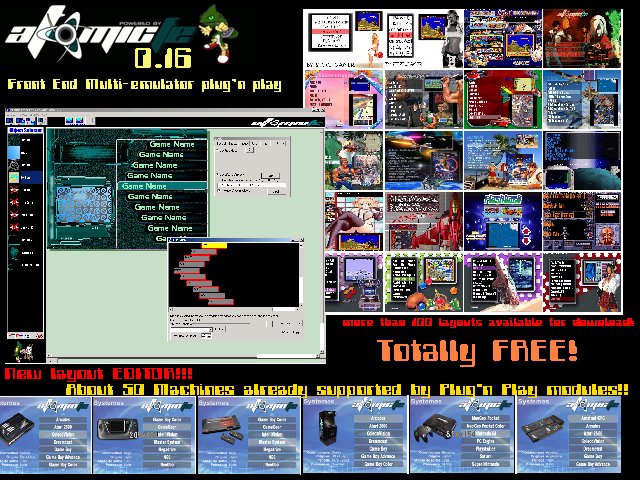 http://www.atomicfe.com http://www.atomicfe.com |
| |
| Lord Hiryu | |  Master of Stick Of Pain!!!! I wanna Rock!!!!!!! And 80's Porn Star too!!!!!
 Grupo: Moderadores generalesMensajes: 4740 Location: Por Murcia,Barna,Madrid y Valencia más o menos Status: | |
| Salut Youki!!! This night I will try it!! Now I have many headaches with the Advmenu..(I'm not able to run Kgen98 on Dos). Is time for changes...(I think..  ) On sevoit!! |
| |
| Youki | | Jugón
Grupo: MemberMensajes: 55 Status: | |
| Hi, I remind you AtomicFE is a Front End for Windows, not DOS. but you can manage to run DOS emul from Windows using Atomic.  |
| |
| Lord Hiryu | | Master of Stick Of Pain!!!! I wanna Rock!!!!!!! And 80's Porn Star too!!!!!
Grupo: Moderadores generalesMensajes: 4740 Location: Por Murcia,Barna,Madrid y Valencia más o menos Status: | |
| I know. The fact is that I still want to use Advmame in dos mode...(original resolutions), but also....I want to run a megadrive, snes and....Daphne....(cobra command rules!!!)
For this reason, I think to change from real Dos, to window dos under Win98. |
| |
| Youki | | Jugón
Grupo: MemberMensajes: 55 Status: | |
| Are you using a 15khz screen?
Do you have an ArcadeVGA ? if not , how do you expect to run your windows in 15khz?
Because under Dos , it is easy with ARCMON.SYS , but under windows , if you don't have a ArcadeVGA, there is PowerStrip (but doesn't work with all card) or may be a video card with a TV out but the quality is not very good.
|
| |
| Lord Hiryu | | Master of Stick Of Pain!!!! I wanna Rock!!!!!!! And 80's Porn Star too!!!!!
Grupo: Moderadores generalesMensajes: 4740 Location: Por Murcia,Barna,Madrid y Valencia más o menos Status: | |
| My Config at the moment is: AVGA (Ati7000 based...the first ones), PIV 2.4, 512Mb Ram, Advmame and Advmenu running under Dos...(win98SE without gui). I will try to run all under win98..(advmame is easy), the real deal comes with the FE....but I'll try!! They are my two babies.....the RetroArcade and my new "build from scratch" Vertical Arcadium, both with Dos and Advmame.....(Retroaracde has a Hantarex MTC 25" screen, and Vertical Arcadium a 21" Mitsubishi PC monitor in vertical position) 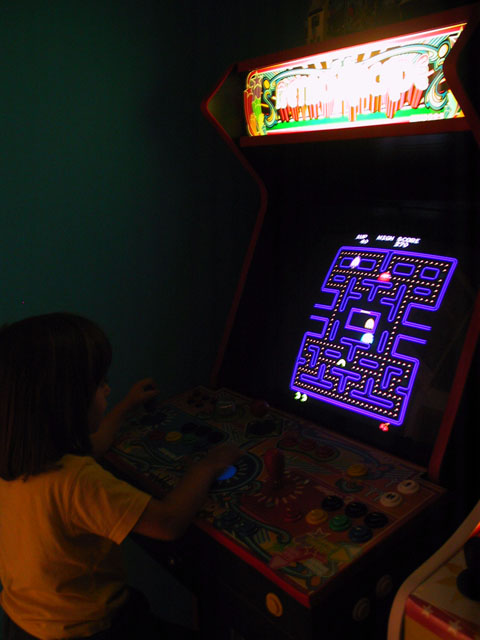 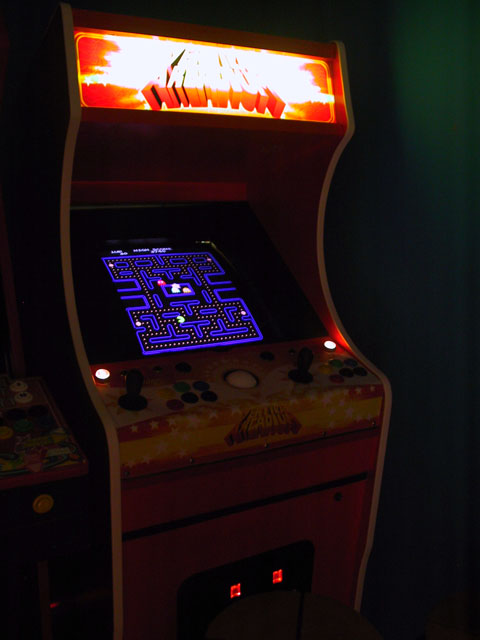 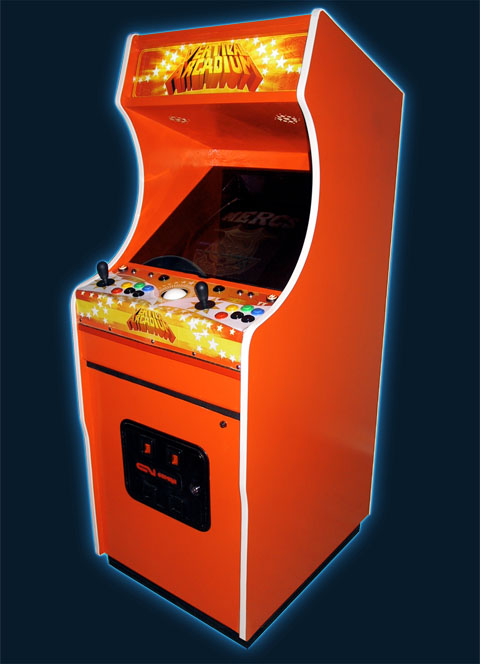 On sevoit! |
| |
| Youki | | Jugón
Grupo: MemberMensajes: 55 Status: | |
| If you have an ArcadeVGA, you shouldn't use ADVMAME. DMAME is better. (if you are under DOS).
With an ArcadeVGA you can have real resolution with DMAME. you just have to generate INI file for games using AVRES tool (can be found on ultimarc web site or on AtomicFE web site (link is in the comment of arcade module)).
ADVMAME modify VGA Card register to create custome resolutions , The ArcadeVGA already own most of arcade game orginal resolution without having to modify register.
I strongly suggest if you go for Win 98 (or even better XP) to use a windows version of mame.
|
| |
| Lord Hiryu | | Master of Stick Of Pain!!!! I wanna Rock!!!!!!! And 80's Porn Star too!!!!!
Grupo: Moderadores generalesMensajes: 4740 Location: Por Murcia,Barna,Madrid y Valencia más o menos Status: | |
| Salut Youki.
It's true that AVGA has many real resolutions. But I prefer Advmame, 'cause I can change something in the video menu, and see the changes at real time.
Yesterday, I tried your FE again.
I already config all, but, when I try to run a game, apears a message that told me...."X game is not available...(or found...or similar message)".
This is the Path of the emulator:
c:\mame\advmame.exe
And the path for the roms:
c:\roms
What's wrong in my config?¿? |
| |
| Youki | | Jugón
Grupo: MemberMensajes: 55 Status: | |
| Hi, So i suppose you tried to make your own config and didn't use a Plug'n play module? If you downloaded plug'n play module, in a first time you have to disable them to do your confg. (use plugnplaymanager.exe to disable modules) Then run AtomicManager.exe Go on the "folder" tab. Specify roms folder as : c:\roms Specify default emulator as : c:\mame\advmame.exe Save your config file , and click on "Set up as Start config" button. Then exit AtomicManager and run Atomic.exe It should work. If it does work. Check your folder again, and check if you didn't misstyped emulator name. Then check , if your roms are directly in the c:\roms folder (not in a subdirectory). Where do you see exactly the message? What is the exact message? what version of advancemame you use? Usually if you run advancemame from a command line what do you type? (ex, if you want run pacman , do you type something like : c:\mame\advancemame.exe pacman.zip or c:\mame\advancemame.exe c:\roms\pacman.zip or c:\mame\advancemame.exe pacman or..etc... ) Give these information, and i will give you the solution .. some mame version have specificity , mainly old one and dos one.... thanks |
| |
| Lord Hiryu | | Master of Stick Of Pain!!!! I wanna Rock!!!!!!! And 80's Porn Star too!!!!!
Grupo: Moderadores generalesMensajes: 4740 Location: Por Murcia,Barna,Madrid y Valencia más o menos Status: | |
| I'm using Advmame 0.99 Dos version. At this moment, Advmenu 2.4.13 is my FE. If I want to run a game, without using advmenu, I'll do in this way: c:\mame\advmame.exe c:\roms\pacman.zip All the roms are inside the folder ROMS (not in a sub-folder). All I do as you explain in atomic manager.exe. Put the folders, mark the amulator executable, click on "Save at Startup config", then SAVE (by default it saves as ATOMIC.CFG), and then CLOSE. The exactly message I can't tell you...('cause now I'm working....or something... ) Thanks in advance Youki. A plus!! |
| |
| Youki | | Jugón
Grupo: MemberMensajes: 55 Status: | |
| But where do you see the message?
Is it a message box when you run atomic? or you see something directly in Atomic (in the list)? or is it when you try to run the game.?
Could you send me (or cut and paste here) your : Atomic.cfg file
and a file called : Config.Atomic
Thanks
|
| |
| Lord Hiryu | | Master of Stick Of Pain!!!! I wanna Rock!!!!!!! And 80's Porn Star too!!!!!
Grupo: Moderadores generalesMensajes: 4740 Location: Por Murcia,Barna,Madrid y Valencia más o menos Status: | |
| The error appears in a new window. I think is something in the Advmame.rc file, 'cause this is the exact message: QUOTE Advance Error
File e:\programas\e\goldnxj2.zip is not supported In the advmame.rc all the dir are Ok...  This is my atomic.cfg QUOTE ROMDIR=E:\Programas\g
SNAPDIR=E:\Programas
SNAPVIDEODIR=C:\AtomicFE_v016\mame\snap
MARQUEEDIR=C:\AtomicFE_v016\mame\marquee
TEMPLATEDIR=E:\Temp
METADATADIR=C:\AtomicFE_v016\METADATA
MAMEEXE=E:\Programas\g\advmame.exe
GAMELIST=GameList.Txt
EXCLUDELIST=Exclude.txt
CUSTOMDIR1=C:\AtomicFE_v016\mame\marquee
CUSTOMDIR2=C:\AtomicFE_v016\mame\marquee
ROMEXTENSION=ZIP
SNAPEXTENSION=PNG
USERLIST=FAVORITES
TRANSFILE=zinc1.00.emu
CREDITSDIR=C:\ATOMICFE\CREDITS
RELATIVEROMDIR=E:\Programas\g
PICTURELISTDIR=
USERELATIVEROMDIR=NO
ESCAPEKILLPROCESS=NO
MOUSETYPE=0
MOUSESENSITIVITY=10
FONTRATIO=4
FONTHEIGHTDIVISOR=3
PAGEJUMP=0
PASSWORDENABLED=NO
KEEPRATIO=NO
PASSONLYROMNAME=NO
MIRRORSCREEN=NO
MUSICENABLED=YES
SHUTDOWN=NO
SOUNDENABLED=NO
UseUserList=NO
AUTOLISTNAME=NO
SELECTCONFENABLED=NO
UseTransFile=NO
SORTED=NO
SORTED2=NO
RESOLUTIONX=640
RESOLUTIONY=480
AVGAIDX=-1
UseGameList=NO
USEROMEXTENSION=YES
COINERDELAY=500
QuoteParams=YES
REPEATKEYDELAY=100
EXCLUSIFMODE=NO
FREEPLAY=NO
WINDOWMODE=NO
CREDITS=NO
START2CREDITS=NO
MAMEALLOWSCONFIG=YES
MAMEALLOWSEXIT=YES
COCKTAIL=NO
ENABLEMISSINGMARQUEETEXT=YES
MISSINGMARQUEEFONT=Arial
MISSINGMARQUEETEXTCOLOR=0
LOADINGSCREEN=NONE
HIDEEMULATORRUN=YES
LOADINGSCREENMAXDELAY=40000
AUTORUN=NO
CREDITCOINCOUNTER1=1
CREDITCOINCOUNTER2=1
INACTIVITYTIME=60000
LAYOUTORIENTATION=1
MULTIEXTENSION=YES
EXT=ZIP
TEXTALIGN=
RUNGAMEATSTART=NO
RANDOMSTART=YES
STARTGAME=pacman
MARQUEELISTSPACE=0 |
| |
| Youki | | Jugón
Grupo: MemberMensajes: 55 Status: | |
| If i believe you cfg file. you have your ADVMAME in the same folder than ROM? QUOTE ROMDIR=E:\Programas\g
MAMEEXE=E:\Programas\g\advmame.exe I think you misstyped the error message, because it said that the game is : e:\programas\ e\goldnxj2.zip , i would expect e:\programas\ g\goldnxj2.zip So try that : - Open a Dos box. Type : (press enter after each end of line) CODE e:
cd \
cd programas
cd g
advmame.exe e:\programas\g\goldnxj2.zip I think, you will have the same error message. (let me know) If you have the same error message , try : CODE advmame.exe goldnxj2.zip If it works. Go in AtomicManager , check "advanced options" on the "general tab" , then go on the "advanced" tab that appears. check : "Send ROM Extension to Emulator" uncheck "Quote parametres" check : "Use Only Rom Names (remove path" If it doesn't work , try to type : if this one works , in that case : Go in AtomicManager , check "advanced options" on the "general tab" , then go on the "advanced" tab that appears. uncheck: "Send ROM Extension to Emulator" uncheck "Quote parametres" check : "Use Only Rom Names (remove path)" Let me know the result of each case. And error message you see if there is. |
| |
| Lord Hiryu | | Master of Stick Of Pain!!!! I wanna Rock!!!!!!! And 80's Porn Star too!!!!!
Grupo: Moderadores generalesMensajes: 4740 Location: Por Murcia,Barna,Madrid y Valencia más o menos Status: | |
| It works !! The last option is the correct. I uncheck, the first two option and mark the third one. Now, I will install the megadrive plug'in. First I will read all the txt. A plus et merci. |
| |
| Youki | | Jugón
Grupo: MemberMensajes: 55 Status: | |
| Great! |
| |
| 17 respuesta(s) desde el 14/6/2006, 15:19 |
| | | | |
|


